Category: Tor

  • How we accidentally broke our Tor exit relays

    Making technology work how you expect it to, and keep it working that way can be difficult at times. Changes in configuration or software updates can put services into a broken or half-broken state, and we had the latter happen to us.

    In the spirit of transparency, we are writing about the painful discovery that many of our Tor exit relays (at least 1/3) have been broken for (at the very least) weeks, and possibly months without our knowing.

    I’d like to thank the team at Tor Project for letting us know about the issue, and how to reproduce it, which ultimately led to it being discovered and fixed.

    Root cause
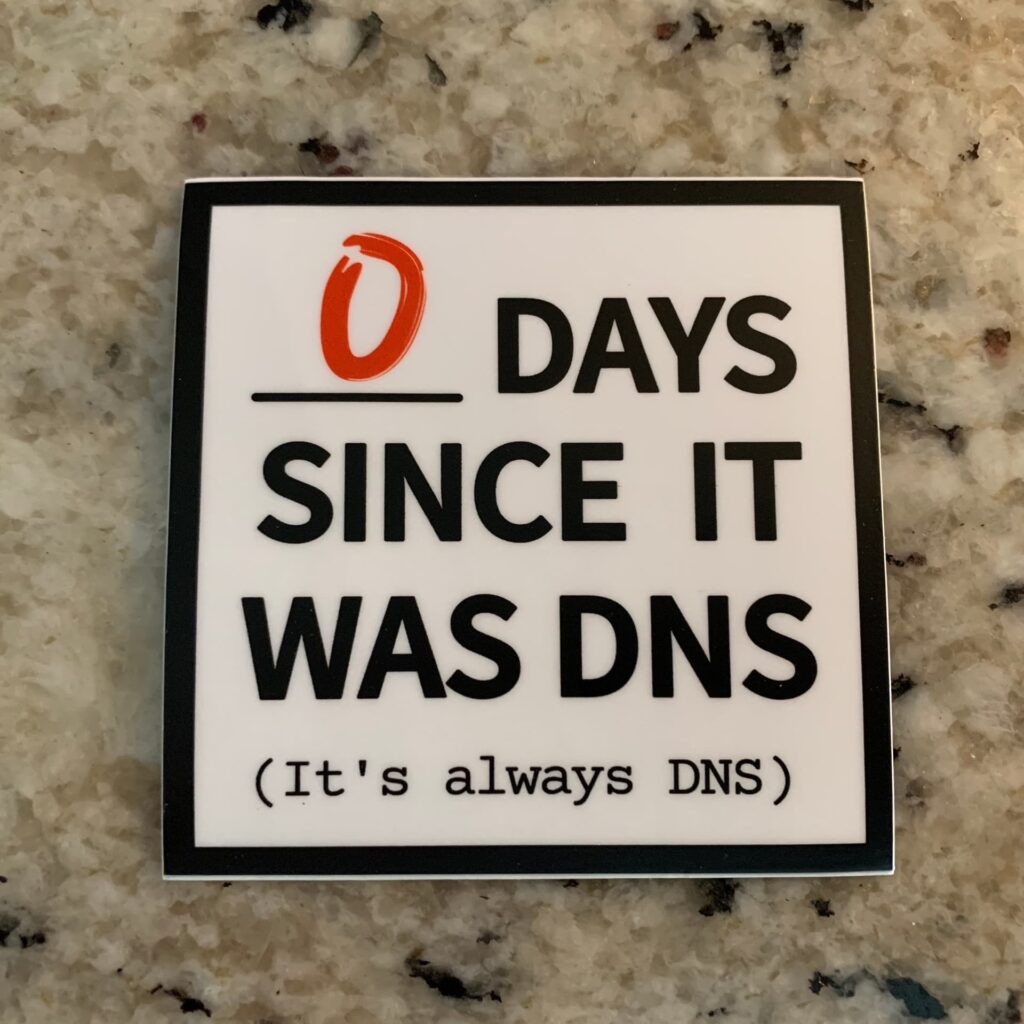
    Credit: https://itsfoss.community/t/its-always-dns-lol/10820

    Based on the image, you might suspect what the issue was.

    It was DNS. Specifically, it was Tailscale’s MagicDNS feature. DNS queries were not getting resolved for some reason that is unknown to us. This means that anyone who ended up connecting to our Tor exit relays failed to connect to nearly every domain/subdomain by failing to resolve hostnames. Connecting to IPs worked just fine.

    Before we go on blaming Tailscale, I want to state that we don’t know why MagicDNS failed in the way we observed, we just know that it did. Ultimately, disabling MagicDNS on our exit relays resolved the issue entirely. When we enabled it, and tested again, it failed. As a result, we’ve left it off.

    Technical analysis

    We knew the symptom was that DNS resolution seemed to fail, which was noted by the nice people at Tor.

    We started by attempting to reproduce the issue ourselves. This required pinning our Tor instance/daemon on our local computer to a specific exit relay’s fingerprint that was exhibiting this strange behavior. For example, by modifying our Tor daemon’s torrc file and adding the below line to it, we could force our local Tor daemon to exit all traffic on that relay.

    ExitNodes F34EE673122518873E717C128E35A389B72C7837 

    This fingerprint corresponds to our UnredactedSnowden relay.

    We then pointed one of our browsers to use the local SOCKS proxy the Tor daemon listens on (127.0.0.1 port 9050) to send traffic through Tor.

    When attempting to connect to any website, it failed, but the reason was unclear and did not appear to display an error related to a DNS resolution issue.

    As DNS was still the suspect here, the easiest thing to do was to SSH into that exit relay and run a tcpdump to capture all inbound and outbound packets that used TCP or UDP port 53, such as the one below.

    tcpdump -i any -n port 53

    Once we did that, we discovered that nearly all DNS queries originated from Tor seemingly went out to the 100.100.100.100 MagicDNS IP, but nothing was returned on most queries. We knew at this moment, that it was indeed a DNS resolution problem.

    An anonymized example of what we saw:

    17:11:52.164204 tailscale0 Out IP 100.69.x.x.22065 > 100.100.100.100.53: 40707+ A? domain.com. (45)
    17:11:52.172049 tailscale0 Out IP 100.69.x.x.22065 > 100.100.100.100.53: 33552+ A? domain.com. (33)
    17:11:52.203409 tailscale0 In  IP 100.100.100.100.53 > 100.69.x.x.22065: 47343 NXDomain 0/1/0 (119)
    17:11:52.321235 tailscale0 Out IP 100.69.x.x.22065 > 100.100.100.100.53: 45366+ A? domain.com. (28)
    17:11:52.321271 tailscale0 Out IP 100.69.x.x.22065 > 100.100.100.100.53: 16617+ A? domain.com. (35)
    17:11:52.321303 tailscale0 Out IP 100.69.x.x.22065 > 100.100.100.100.53: 39612+ A? domain.com. (29)
    17:11:52.352491 tailscale0 Out IP 100.69.x.x.22065 > 100.100.100.100.53: 63111+ A? domain.com. (34)
    17:11:52.383332 tailscale0 Out IP 100.69.x.x.22065 > 100.100.100.100.53: 15513+ A? domain.com. (35)
    17:11:52.501714 tailscale0 Out IP 100.69.x.x.22065 > 100.100.100.100.53: 16308+ A? domain.com. (29)
    17:11:52.532238 tailscale0 Out IP 100.69.x.x.22065 > 100.100.100.100.53: 7697+ A? domain.com. (40)
    17:11:52.540674 tailscale0 In  IP 100.100.100.100.53 > 100.69.x.x.22065: 22472 0/1/0 (89)
    17:11:52.544683 tailscale0 Out IP 100.69.x.x.22065 > 100.100.100.100.53: 8052+ A? domain.com. (47)

    We tried several things;

    • Switching the MagicDNS nameservers to other ones & restarting Tor.
    • Rebooting the exit relay we were testing with to see if it was a strange Tailscale daemon/interface/routing issue.
    • Using dig via CLI on the test relay which queried the MagicDNS IP (100.100.100.100) which worked without issue.

    We were at a loss, and couldn’t figure out what was happening. We then decided to disable MagicDNS on the test relay to see what would happen. It worked, DNS queries started flowing and getting resolved responses via the same nameservers directly.

    We subsequently disabled MagicDNS on the rest of the exit relays with an adhoc Ansible shell command.

    Our conclusion

    The problem appeared to be with the abstraction that MagicDNS does, and queries originating from Tor did not appear to work 99%+ of the time when the feature was enabled. However, queries from dig via CLI appeared to always work. We suspect that MagicDNS fails in some sort of way when too many queries are directed at its 100.100.100.100 IP which is seemingly routed out the tailscale0 interface (& subsequently onto the physical interface). However, this doesn’t make complete sense, as we would expect queries from dig to fail as well.

    We may never know what happened exactly, and we don’t want to leave it in a broken state long enough to figure it out. At this point, it’s safe to say that we are leaving MagicDNS disabled on our Tor exit relays for the foreseeable future.

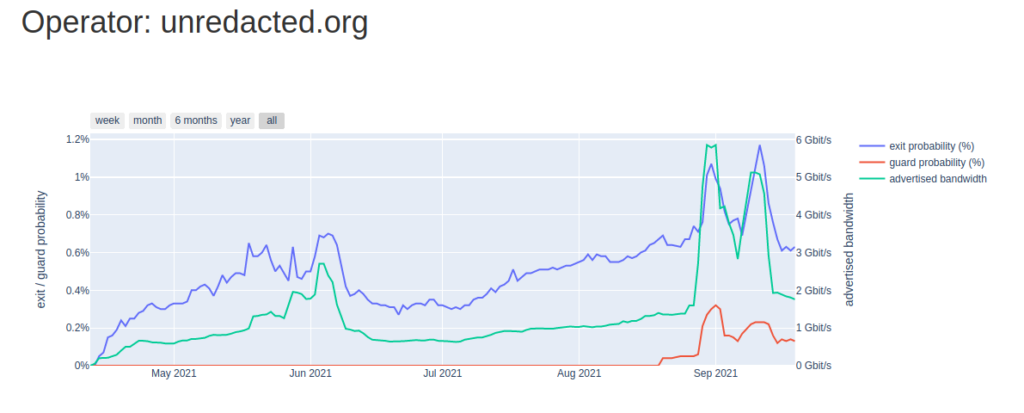
    Shortly after resolving the issue, our Tor exit relay traffic rate shot up beyond previously normal levels and hit our full capacity (as of writing this).

    In the near future, we will explore running our own local DNS resolver on each exit relay, which we’ve done in the past – but had to move away from due to an overload of bogus queries originated from Tor which also resulted in DNS resolution failures. DNS over HTTPS (DoH) or DNS over TLS (DoT) are also great options we may explore further.

    We hope you found this interesting and insightful. If you enjoy what we do, please consider making a donation. Unredacted is a non-profit organization that provides free and open services that help people evade censorship and protect their right to privacy.

  • Running your own Tor relays

    As many of you may know, Tor relays are quite important to the Tor network. They allow Tor users to access .onion sites and regular internet. While hidden services (.onion sites) are great, the fact is that a lot of the internet can not be found within the Tor network. Exit relays, being one of the most essential relay types, facilitate the bridge between Tor, and the regular WWW (World Wide Web), allowing for true internet freedom.

    For a good portion of 2021, we ran (and currently run) a set of Tor exit relays on dedicated servers with unmetered bandwidth. This is something that we haven’t attempted before, and typically ran guard and middle relays exclusively to not have to deal with abuse reports. Many people fear running exit relays because of legal issues some have experienced, which is completely understandable. You may also have a hard time finding a hosting provider that allows exit relays (see more below for suggestions). In this post, we will go through some of the things we’ve found to be beneficial in our endeavor to provide fast and secure infrastructure to the Tor network.

    Network network network

    The most important thing we’ve found is operating your own network when running exit relays.

    1. Having your own ASN (autonomous system number) is a great thing to have. It allows you to have a great deal of flexibility in what you can do with your network. Having your own ASN such as ours allows us to advertise our IPv4 and v6 prefixes on our servers or routers directly to our upstream (hosting) provider. We have more control over the routing, and our network looks unique when peering into our setup. We even have the option to establish our own private or public peering with other networks, allowing us to have direct connections to other networks (for speed and free bandwidth).
    2. Having your own IP prefixes (rented or owned) gives you autonomy. With your own IPs, you directly handle abuse complaints, as your email can be listed on the abuse contact of the IPs. With this, you do not need to be at the mercy of your hosting provider, who may or may not penalize you for every abuse complaint they receive for your exit relay. Abuse complaints nowadays are generally automated, making life challenging with many coming in per day. As we do, you can simply set up an auto-responder to reply to incoming complaints and ask that another email be reached if the complaint is serious and needs direct attention.

    Hosting

    This part is really up to you, but we recommend several things here.

    • A hosting or upstream provider that allows Tor relays (especially exit relays). We’ve tested a few providers, and can recommend them for Tor usage (as of 01/24/22).

      Terrahost (exits & guard/middle allowed)
      – Locations: Norway
      – Service: Dedicated & virtual servers, misc others

      BuyVM/Frantech[aff link] (exits & guard/middle allowed)
      – Locations: Las Vegas, New York, Miami & Luxembourg
      – Services: Virtual servers, misc others

      Less preferred/highly used hosts:

      Hetzner (dedicated & cloud [aff link]) (guard/middle allowed)
      – Locations: Finland, and various locations in Germany
      – Services: Dedicated & cloud servers

      OVH / SoYouStart (guard/middle allowed)
      – Locations: Global network in various countries (mainly Europe)
      – Services: Dedicated, cloud, virtual and various other services

      More info:

      Want to know how to run a relay? Check Run A Relay out.
      If you are familiar with Ansible, be sure to use ansible-relayor.
    • Dedicated hardware, with high GHz CPU cores and an unmetered network port, is the most important for Tor relays. Obviously, with the vast amount of traffic that transits the Tor network you are going to need powerful hardware, as Tor is quite resource intensive with all the encrypting and decrypting being done on the fly. You absolutely do not want noisy neighbors, commonly seen on VPS/VM providers.

      Hardware specifics to look for:
      – 3GHz+ CPU cores with at least 1 core per relay.
      – 2 GB+ of DDR3 (or higher) RAM per relay.
      – A dedicated network uplink to your provider. Bonus points for an unmetered port where you are not charged for overages.
    • Look for a stable network. Look for a provider with a stable network, that doesn’t commonly experience congestion. Congestion, and packet loss can provide a horrible experience for users on the Tor network, resulting in a slow browsing experience with timeouts.

      Network specifics to look for:
      – A well peered hosting provider with multiple public/private peerings and public transit upstreams (think; Cogent, GTT, Telia, Lumen, etc), so that you can reach Tor network users and other relays at a low latency (which improves overall Tor network performance)
      – A provider that experiences a lower level of network congestion, which results in your ability to use your full port speed most of the time. As the Tor network uses the protocol; TCP, it is important to have a consistent good and reliable network to prevent excess TCP re-transmissions, which increases latency.

    Legal

    Legality is important, so make sure you are following laws in your country to stay within the law.

    1. Operate your own LLC, non-profit, company, or corporation. This allows you to part yourself from your Tor exit relays. While you are obviously running them, a legally formed organization will provide you with some legal protections depending on where you live.
    2. Always follow up with serious abuse complaints or subpoenas from law enforcement. This is important, and allows you to continue operating your network as a legitimate netizen. Do take abuse complaints seriously, and try to provide advice to the reporter about the Tor network and how they can circumvent future abuse. If needed, you can also disallow users from utilizing various network ports (such as port 22 used for SSH, a common source of abuse complaints) on your exit relays.

    As our journey is ever evolving, we will attempt to add to this list when we discover more along the way. If you have a suggestion, feel free to contact us, and we’ll consider adding it as well.

    G’day,
    Zach

  • Our vision of the Tor network

    Internet usage has sky rocketed with COVID-19, and the internet is expanding, so are we. As you may have noticed, we have been putting a lot of work in to expand our Tor relay & bridge network. As of writing we have over 27 nodes which reside on a diverse set of networks. Today I would like to show you what our vision is for our segment of the Tor network and the network as a whole.

    Some of our statistics

    Tor is amazing, it provides a scalable and simple way to protect and anonymize your internet traffic. Whether it be purely layer 4 (e.g. TCP/UDP) or layer 7 (e.g. HTTP), the Tor network can route it. Tor does many things, but on a daily basis, it protects good people in censored and oppressed situations, providing a way for them to safely access the internet, and all for free with open source software. Because Tor is so great, it requires dedicated volunteers, relay and bridge operators to provide that bandwidth, CPU and RAM capacity. What’s so great is that we have so many individuals already donating their time and money to do this. However, I think we can do better. We should continue to expand the Tor network by providing more bandwidth and more reliable infrastructure for optimal routing with low latency and high throughput. Not only that, we should focus on diversifying the network and providing more relays and bridges running on top of diverse networks. That’s what we’d like to accomplish, and with everyone who loves what Tor does.

    Sadly there are many relay operators that do not maintain their infrastructure well, falling behind on updates and doing little to no monitoring. By running stable and reliable Tor relays and bridges that vision of a better network ensues. We take into careful consideration potential ethical and security risks. The Tor Project team and community already protect against malicious operators and the network itself is diverse enough to handle that. However we should still do everything we can to protect the privacy of traffic that transits through our nodes. Our nodes run on top of various hosting providers, in various geographical locations. We favor providers that show a general respect for privacy and have a beefy network, no 100Mb/s rate limit with 1TB of bandwidth here. We also have our own ASN and IP space for exit relays: unredacted.org/about/network

    To protect our nodes from compromise we do our best to harden against commonly exploited attack surfaces. Nothing fancy here, but we do our best at the moment. This requires a consistent state across all nodes. For this, we use Ansible (an automation tool) which allows you to automate the configuration of your computers. With this, we enforce a pretty strict SSH policy, iptables rules, packages that every node should have, Prometheus exporters, wireguard mesh (Tailscale), various others and the full configuration of our Tor daemons. For Tor automation, we use an Ansible playbook called ansible-relayor. All of this allows us to automate the configuration of our 27 Tor nodes, applying updates, and rotating keys just to name a few. Without this, manual configuration of 27 nodes would be an extremely painful and arduous process to say the least. In theory, we can now automate the configuration of every OS feature.

    Protection is not the only thing, we need good monitoring too. To ensure consistent and reliable service, you just have to monitor your services. We make sure we have deep enough insight into our nodes, but without exposing any Tor user data. We do not log IPs, or analyze the netflows of our traffic. We collect basic metrics using Prometheus and node_exporter. Prometheus (+AlertManager) is configured to send notices through email for high CPU, RAM, disk, I/O load (and other things). We also have a 3rd party which notifies via email and SMS if something goes down. We hope to expand this in the future so that we can also collect route and packet loss statistics from outside sources that are looking into our network. Packet loss is a large cause of high latency, any way we can reduce that on our network would be crucial as the Tor network is typically already higher latency.

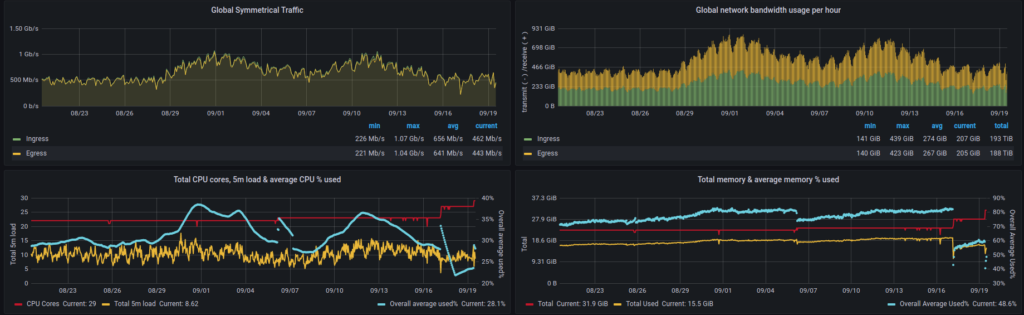
    Now, how have we been doing so far? See for yourself! We made publicly accessible graphs and data points that show the utilization of our nodes. We’d like to be as transparent as possible, so these metrics do not contain any revealing info.

    https://grafana.unredacted.net/d/ce-tor-relays/unredacted-tor-relay-metrics?orgId=1

    The past 30 days as of writing

    As you could imagine, all of this requires funding to do. We ask that you help us build a better Tor network through your support and donations, or run your own node.

    If you choose to donate, we accept many forms of payment, in addition to cryptocurrency. To donate, please visit our Donation page. Your donation will make a visible impact on the Tor network through our metrics. If you wish to be notified what your funds went to, we can give you the breakdown.

    Thanks for your time,
    Zach

Donate